API
Introduction
This page provides an overview of the OpenAtlas API. An (API) allows easy and controlled access to the data stored in an OpenAtlas instance from external sources, such as presentation sites or analytical tools. The information provided is readable for human and machines alike. By using the API data can be queried in several different ways.
The development of the OpenAtlas API follows the RESTful constraints.
Testing the API is possible via: https://demo.openatlas.eu/swagger. Using it with the data from a specific OpenAtlas instance is possible by visiting <your-domain.eu>/swagger. Be aware that the API has to be set to public in the admin setting section of the instance.
Quick Start Guide
The API can be accessed via the OpenAtlas user interface or through an URL GET requests.
1. UI access
Each detail view of an entity provides two buttons (JSON and RDF). Via those buttons the format, in which the entity will be exported, can be selected. If the buttons are not visible, please change the Show API links in the Display tab of your Profile in the settings.
By using the UI in this way, only a single entity can be accessed.
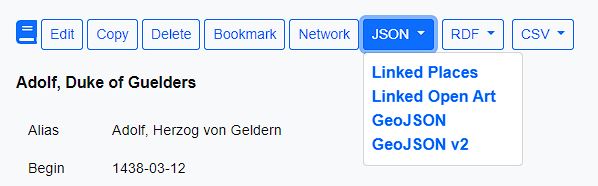
Possible JSON API formats
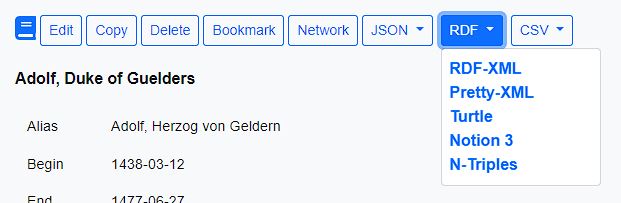
Possible RDF API formats
2. URL / GET access
The most common way to communicate with the OpenAtlas API is through GET request. This can be done either manually from the local browser or with other applications following a specific URL schema:
{domain}/api/{api version}/{endpoint}?{parameter}&{parameter}
- Example URL
- Domain
Location of the OpenAtlas instance from which information should be retrieved, e.g. https://demo-openatlas.eu/ for the demo version
- API Version
Input without a version number leads to the current stable version (https://demo.openatlas.eu/api/entity/5117). If another version of the API is to be used, the version number can be specified (e.g. demo.openatlas.eu/api/0.4/entity/5117). A version overview can be found under Versioning.
- Endpoints
Specific data can be queried by attaching an endpoint (e.g. demo.openatlas.eu/api/0.4/entity/5117). The information is provided in a human - and machine-readable form. For further information see Endpoints.
- Required path values
Must be included to create a valid URL. Different endpoints require different values (e.g. demo.openatlas.eu/api/0.4/entity/5117. 5117 is an ID as required by the entity endpoint) - all required values are state in { } at the Endpoints definition.
- Parameters
Used to structure additional information for a given URL. They are added to the end of an URL after the “?” symbol (e.g. demo.openatlas.eu/api/0.4/entity/5117**?**download=true). All available Parameters can be found under Parameters. For more general information see this article.
Versioning
stable |
deprecated |
unstable |
unavailable |
|---|---|---|---|
None |
1.0 |
0.3, 0.2, 0.1 |
The OpenAtlas API follows the notion of sequenced based versioning and reflects the significance: major.minor.fix e.g. 3.11.1. Only the major number is used for the URL path. Minor and fix are used for documentation reasons only with the exception of versions 0.1, 0.2, 0.3 and 0.4. A stable version of the API will be available at all times. In addition, previous versions will still be usable but tagged as deprecated. A warning will be posted in the roadmap and release notes before a versions is discontinued. Unstable versions are currently still under development, so breaking changes may occur at any time without prior notice.
Endpoints
Through different endpoints, data can be retrieved from OpenAtlas. Each version has an own set of endpoints, make sure to use the correct one.
The current version 0.4 endpoint descriptions are available at:
Current OpenAPI specification for the OpenAtlas demo version
Local OpenAPI specification: this link is only available if called from an OpenAtlas instance
The requested information is provided in the Linked Places format (LPF). Alternatively, GeoJSON, Linked Open Usable Data or RDFs, derived from Linked Open Usable Data data, can be accessed.
Parameters
By using parameters the result of the requested endpoint can be manipulated (filtered, searched, sorted, etc.). Each endpoint provides another set of parameters which can be used. Consult the Endpoints list for more details.
Parameters are added to the end of an URL after the “?” symbol (e.g. demo.openatlas.eu/api/0.4/entity/5117**?download=true**) and are connected with the “&” sign. For more general information on this, see this article.
Current OpenAPI parameters at the OpenAtlas demo version
Local OpenAPI parameters: this link is only available if called from an OpenAtlas instance
Error handling
OpenAtlas uses conventional HTTP response codes to indicate the success or failure of an API request. Codes in the 2xx range indicate a successful request while those in the 4xx range signal an error - providing the information was not possible. Codes in the 5xx range indicate a server error. If any issues occur when using the OpenAtlas API, a case-specific error message is provided in JSON format, describing the error in more detail.
Example:
{
     "title": "entity does not exist",
     "message": "Requested entity does not exist. Try another ID",
     "url": "https://demo.openatlas.eu/api/entity/9999/",
     "timestamp": "Tue, 19 Jul 2022 13:59:13 GMT",
     "status": 404
 }
If an invalid endpoint parameter value e.g. ?sort=kfs instead of ?sort=desc is entered, Flask catches this via its own Flask-RESTful extension and displays an error message provided by its own error handler
Proxy
If the server is behind a proxy, issues with the RDF export of entities can occur. To provide the OpenAtlas API with a proxy server, add the following line to instance/production.py
PROXIES = {
    'http': 'http://someurl.org:8080',
    'https': 'http://someurl.org:8080'}
Authentication guide
By default, the OpenAtlas API is not public and requires authentication. However, it can be set to Public in the API settings.
The following authentication methods are supported:
Session-based: If accessed through a web browser, the API uses the existing session of a logged-in user.
Token-based (JWT): For programmatic access, a JSON Web Token (JWT) can be used. The token must be sent in the HTTP header: Authorization: Bearer <your-token>. Tokens can be generated by an Administrator in the API section.
IP Whitelist: Requests originating from an IP address on the ALLOWED_IPS (modified in production.py) are granted access.
If the API is set to public, no authentication is needed for GET requests.
API Reference
Entity Endpoints
- GET /entity/{entityId}
Retrieves information about a single entity.
- Parameters:
entityId (integer) – Specific entity ID
- Query Parameters:
download (boolean) – Download results
show (array) – Select which keys should not be displayed. This can improve performance
format (string) – Specify the format for the returned results.
export (string) – Export the entities in either a simple CSV format or a ZIP file containing CSV files optimized for network analysis.
locale (string) – Choose language for system inherent labels
centroid (boolean) – Will calculate the centerpoint for all polygons and linestring and add them to geometries
- Status Codes:
200 OK – Success
400 Bad Request – Bad Request
401 Unauthorized – Unauthorized
403 Forbidden – Access denied
404 Not Found – Resource not found
409 Conflict – Conflict
500 Internal Server Error – Internal server error
Entities Endpoints
- GET /query/
Retrieves a list with entity ID, CIDOC CRM code, system class, or view class. You can combine these endpoints in a single query.
- Query Parameters:
entities (array) – The entity IDs to be requested.
view_classes (array) – Retrieve entities based on the specified view classes.
system_classes (array) – Retrieve entities based on the specified system classes
cidoc_classes (array) – Retrieve entities based on the specified CIDOC classes.
linked_entities (array) – The entity IDs for which all linked entities will be retrieved.
download (boolean) – Download results
count (boolean) – Show integer count of how many entities would the result give back
centroid (boolean) – Will calculate the centerpoint for all polygons and linestring and add them to geometries
show (array) – Select which keys should not be displayed. This can improve performance
format (string) – Specify the format for the returned results.
export (string) – Export the entities in either a simple CSV format or a ZIP file containing CSV files optimized for network analysis.
column (string) – Choose one column to sort the results by. Default value is name.
sort (string) – Sorting result ascending or descending of the given column. Default value is asc.
search (object) –
Search query for specific results.
Filterable categories
entityName, entityDescription, entityAliases, entityCidocClass, entitySystemClass, entityID, typeID, valueTypeID, typeIDWithSubs, typeName, beginFrom, beginTo, endFrom, endTo, relationToID
Values
Values has to be a list of items. The items can be either a string, an integer or a tuple (see Notes). Strings need to be marked with “” or ‘’, while integers does not allow this.
Notes: The category valueTypeID can search for values of a type ID. But it takes one or more two valued Tuple as list entry: (x,y). x is the type id and y is the searched value. This can be an int or a float, e.g: {“operator”:”lesserThan”,”values”:[(3142,543.3)],”logicalOperator”:”and”} The date categories (beginFrom, beginTo, endFrom, endTo) only allow one value in the values field and it has to be formated the following way: YYYY-MM-DD. Month and day values need to filled up with 0, e.g. 800-01-01
Compare operators
equal, notEqual, like (1), greaterThan (2), greaterThanEqual (2), lesserThan (2)
The compare operators work like the mathematical operators. equal x=y, notEqual x!=y, greaterThan x>y , greaterThanEqual x>=y, lesserThan x<y, lesserThanEqual x<=y. The like operator searches for occurrence of the string, so a match can also occur in the middle of a word.
(1)Only for string based categories
(2)Only for beginFrom, beginTo, endFrom, endTo, valueTypeID
Logical operators
Not mandatory, OR is the default value. Logical operators handles, if the values are treated as OR or AND.
The following table outlines the supported operations for each field:
|                  | equal
     | notEqual  | like      | greaterThan | greaterThanEqual | lesserThan | lesserThanEqual |
|------------------|-----------|-----------|-----------|-------------|------------------|------------|-----------------|
| entityName       |     x      |     x      |    x       |             |                  |            |                 |
| entityDescription|      x     |      x     |      x     |             |                  |            |                 |
| entityAliases    |      x     |      x     |     x      |             |                  |            |                 |
| entityCidocClass |      x     |      x     |      x     |             |                  |            |                 |
| entitySystemClass|      x     |      x     |     x      |             |                  |            |                 |
| typeName         |       x    |      x     |     x      |             |                  |            |                 |
| entityID         |       x    |      x     |           |             |                  |            |                 |
| typeID           |      x     |       x    |           |             |                  |            |                 |
| valueTypeID      |      x     |      x     |           |      x       |    x              |    x        |      x           |
| typeIDWithSubs   |      x     |       x    |           |             |                  |            |                 |
| relationToID     |      x     |      x     |           |             |                  |            |                 |
| beginFrom        |      x     |      x     |           |      x       |        x          |     x       |      x           |
| beginTo          |      x     |      x     |           |      x       |          x        |      x      |       x          |
| endFrom          |      x     |      x     |           |       x      |         x         |       x     |       x          |
| endTo            |      x     |      x     |           |       x      |       x           |       x     |      x           |
first (integer) – Starts the result set at the specified entity ID.
last (integer) – Starts the result set after the specified entity ID.
page (integer) – Specifies the page number to retrieve in a paginated result set.
limit (integer) – Limits the number of entities returned in the response. A lower value may improve performance. The default is 20. Set to 0 to return all available entities.
type_id (array) – Filter results to include only entities with the specified type ID or those linked to it.
relation_type (array) – Filters results to show only connections linked by the selected CIDOC CRM property code. If ‘geometry’, ‘types’, ‘depictions’, or ‘links’ are specified in the ‘show’ parameter, these properties will also be displayed.
locale (string) – Choose language for system inherent labels
- Status Codes:
200 OK – Success
400 Bad Request – Bad Request
401 Unauthorized – Unauthorized
403 Forbidden – Access denied
404 Not Found – Resource not found
409 Conflict – Conflict
500 Internal Server Error – Internal server error
- GET /system_class/{system_class}
Retrieves entities based on their OpenAtlas class name.
- Parameters:
system_class (string) – System class to be requested
- Query Parameters:
download (boolean) – Download results
count (boolean) – Show integer count of how many entities would the result give back
show (array) – Select which keys should not be displayed. This can improve performance
format (string) – Specify the format for the returned results.
export (string) – Export the entities in either a simple CSV format or a ZIP file containing CSV files optimized for network analysis.
column (string) – Choose one column to sort the results by. Default value is name.
sort (string) – Sorting result ascending or descending of the given column. Default value is asc.
search (object) –
Search query for specific results.
Filterable categories
entityName, entityDescription, entityAliases, entityCidocClass, entitySystemClass, entityID, typeID, valueTypeID, typeIDWithSubs, typeName, beginFrom, beginTo, endFrom, endTo, relationToID
Values
Values has to be a list of items. The items can be either a string, an integer or a tuple (see Notes). Strings need to be marked with “” or ‘’, while integers does not allow this.
Notes: The category valueTypeID can search for values of a type ID. But it takes one or more two valued Tuple as list entry: (x,y). x is the type id and y is the searched value. This can be an int or a float, e.g: {“operator”:”lesserThan”,”values”:[(3142,543.3)],”logicalOperator”:”and”} The date categories (beginFrom, beginTo, endFrom, endTo) only allow one value in the values field and it has to be formated the following way: YYYY-MM-DD. Month and day values need to filled up with 0, e.g. 800-01-01
Compare operators
equal, notEqual, like (1), greaterThan (2), greaterThanEqual (2), lesserThan (2)
The compare operators work like the mathematical operators. equal x=y, notEqual x!=y, greaterThan x>y , greaterThanEqual x>=y, lesserThan x<y, lesserThanEqual x<=y. The like operator searches for occurrence of the string, so a match can also occur in the middle of a word.
(1)Only for string based categories
(2)Only for beginFrom, beginTo, endFrom, endTo, valueTypeID
Logical operators
Not mandatory, OR is the default value. Logical operators handles, if the values are treated as OR or AND.
The following table outlines the supported operations for each field:
|                  | equal
     | notEqual  | like      | greaterThan | greaterThanEqual | lesserThan | lesserThanEqual |
|------------------|-----------|-----------|-----------|-------------|------------------|------------|-----------------|
| entityName       |     x      |     x      |    x       |             |                  |            |                 |
| entityDescription|      x     |      x     |      x     |             |                  |            |                 |
| entityAliases    |      x     |      x     |     x      |             |                  |            |                 |
| entityCidocClass |      x     |      x     |      x     |             |                  |            |                 |
| entitySystemClass|      x     |      x     |     x      |             |                  |            |                 |
| typeName         |       x    |      x     |     x      |             |                  |            |                 |
| entityID         |       x    |      x     |           |             |                  |            |                 |
| typeID           |      x     |       x    |           |             |                  |            |                 |
| valueTypeID      |      x     |      x     |           |      x       |    x              |    x        |      x           |
| typeIDWithSubs   |      x     |       x    |           |             |                  |            |                 |
| relationToID     |      x     |      x     |           |             |                  |            |                 |
| beginFrom        |      x     |      x     |           |      x       |        x          |     x       |      x           |
| beginTo          |      x     |      x     |           |      x       |          x        |      x      |       x          |
| endFrom          |      x     |      x     |           |       x      |         x         |       x     |       x          |
| endTo            |      x     |      x     |           |       x      |       x           |       x     |      x           |
first (integer) – Starts the result set at the specified entity ID.
last (integer) – Starts the result set after the specified entity ID.
page (integer) – Specifies the page number to retrieve in a paginated result set.
limit (integer) – Limits the number of entities returned in the response. A lower value may improve performance. The default is 20. Set to 0 to return all available entities.
type_id (array) – Filter results to include only entities with the specified type ID or those linked to it.
relation_type (array) – Filters results to show only connections linked by the selected CIDOC CRM property code. If ‘geometry’, ‘types’, ‘depictions’, or ‘links’ are specified in the ‘show’ parameter, these properties will also be displayed.
locale (string) – Choose language for system inherent labels
centroid (boolean) – Will calculate the centerpoint for all polygons and linestring and add them to geometries
- Status Codes:
200 OK – Success
400 Bad Request – Bad Request
401 Unauthorized – Unauthorized
403 Forbidden – Access denied
404 Not Found – Resource not found
409 Conflict – Conflict
500 Internal Server Error – Internal server error
- GET /view_class/{view_class}
Retrieves entities based on their OpenAtlas view class.
- Parameters:
view_class (string) – View class to be requested
- Query Parameters:
download (boolean) – Download results
count (boolean) – Show integer count of how many entities would the result give back
show (array) – Select which keys should not be displayed. This can improve performance
format (string) – Specify the format for the returned results.
export (string) – Export the entities in either a simple CSV format or a ZIP file containing CSV files optimized for network analysis.
column (string) – Choose one column to sort the results by. Default value is name.
sort (string) – Sorting result ascending or descending of the given column. Default value is asc.
search (object) –
Search query for specific results.
Filterable categories
entityName, entityDescription, entityAliases, entityCidocClass, entitySystemClass, entityID, typeID, valueTypeID, typeIDWithSubs, typeName, beginFrom, beginTo, endFrom, endTo, relationToID
Values
Values has to be a list of items. The items can be either a string, an integer or a tuple (see Notes). Strings need to be marked with “” or ‘’, while integers does not allow this.
Notes: The category valueTypeID can search for values of a type ID. But it takes one or more two valued Tuple as list entry: (x,y). x is the type id and y is the searched value. This can be an int or a float, e.g: {“operator”:”lesserThan”,”values”:[(3142,543.3)],”logicalOperator”:”and”} The date categories (beginFrom, beginTo, endFrom, endTo) only allow one value in the values field and it has to be formated the following way: YYYY-MM-DD. Month and day values need to filled up with 0, e.g. 800-01-01
Compare operators
equal, notEqual, like (1), greaterThan (2), greaterThanEqual (2), lesserThan (2)
The compare operators work like the mathematical operators. equal x=y, notEqual x!=y, greaterThan x>y , greaterThanEqual x>=y, lesserThan x<y, lesserThanEqual x<=y. The like operator searches for occurrence of the string, so a match can also occur in the middle of a word.
(1)Only for string based categories
(2)Only for beginFrom, beginTo, endFrom, endTo, valueTypeID
Logical operators
Not mandatory, OR is the default value. Logical operators handles, if the values are treated as OR or AND.
The following table outlines the supported operations for each field:
|                  | equal
     | notEqual  | like      | greaterThan | greaterThanEqual | lesserThan | lesserThanEqual |
|------------------|-----------|-----------|-----------|-------------|------------------|------------|-----------------|
| entityName       |     x      |     x      |    x       |             |                  |            |                 |
| entityDescription|      x     |      x     |      x     |             |                  |            |                 |
| entityAliases    |      x     |      x     |     x      |             |                  |            |                 |
| entityCidocClass |      x     |      x     |      x     |             |                  |            |                 |
| entitySystemClass|      x     |      x     |     x      |             |                  |            |                 |
| typeName         |       x    |      x     |     x      |             |                  |            |                 |
| entityID         |       x    |      x     |           |             |                  |            |                 |
| typeID           |      x     |       x    |           |             |                  |            |                 |
| valueTypeID      |      x     |      x     |           |      x       |    x              |    x        |      x           |
| typeIDWithSubs   |      x     |       x    |           |             |                  |            |                 |
| relationToID     |      x     |      x     |           |             |                  |            |                 |
| beginFrom        |      x     |      x     |           |      x       |        x          |     x       |      x           |
| beginTo          |      x     |      x     |           |      x       |          x        |      x      |       x          |
| endFrom          |      x     |      x     |           |       x      |         x         |       x     |       x          |
| endTo            |      x     |      x     |           |       x      |       x           |       x     |      x           |
first (integer) – Starts the result set at the specified entity ID.
last (integer) – Starts the result set after the specified entity ID.
page (integer) – Specifies the page number to retrieve in a paginated result set.
limit (integer) – Limits the number of entities returned in the response. A lower value may improve performance. The default is 20. Set to 0 to return all available entities.
type_id (array) – Filter results to include only entities with the specified type ID or those linked to it.
relation_type (array) – Filters results to show only connections linked by the selected CIDOC CRM property code. If ‘geometry’, ‘types’, ‘depictions’, or ‘links’ are specified in the ‘show’ parameter, these properties will also be displayed.
locale (string) – Choose language for system inherent labels
centroid (boolean) – Will calculate the centerpoint for all polygons and linestring and add them to geometries
- Status Codes:
200 OK – Success
400 Bad Request – Bad Request
401 Unauthorized – Unauthorized
403 Forbidden – Access denied
404 Not Found – Resource not found
409 Conflict – Conflict
500 Internal Server Error – Internal server error
- GET /cidoc_class/{cidoc_class}
Retrieves entities based on their CIDOC CRM class code.
- Parameters:
cidoc_class (string) – CIDOC class to be requested
- Query Parameters:
download (boolean) – Download results
count (boolean) – Show integer count of how many entities would the result give back
show (array) – Select which keys should not be displayed. This can improve performance
format (string) – Specify the format for the returned results.
export (string) – Export the entities in either a simple CSV format or a ZIP file containing CSV files optimized for network analysis.
column (string) – Choose one column to sort the results by. Default value is name.
sort (string) – Sorting result ascending or descending of the given column. Default value is asc.
search (object) –
Search query for specific results.
Filterable categories
entityName, entityDescription, entityAliases, entityCidocClass, entitySystemClass, entityID, typeID, valueTypeID, typeIDWithSubs, typeName, beginFrom, beginTo, endFrom, endTo, relationToID
Values
Values has to be a list of items. The items can be either a string, an integer or a tuple (see Notes). Strings need to be marked with “” or ‘’, while integers does not allow this.
Notes: The category valueTypeID can search for values of a type ID. But it takes one or more two valued Tuple as list entry: (x,y). x is the type id and y is the searched value. This can be an int or a float, e.g: {“operator”:”lesserThan”,”values”:[(3142,543.3)],”logicalOperator”:”and”} The date categories (beginFrom, beginTo, endFrom, endTo) only allow one value in the values field and it has to be formated the following way: YYYY-MM-DD. Month and day values need to filled up with 0, e.g. 800-01-01
Compare operators
equal, notEqual, like (1), greaterThan (2), greaterThanEqual (2), lesserThan (2)
The compare operators work like the mathematical operators. equal x=y, notEqual x!=y, greaterThan x>y , greaterThanEqual x>=y, lesserThan x<y, lesserThanEqual x<=y. The like operator searches for occurrence of the string, so a match can also occur in the middle of a word.
(1)Only for string based categories
(2)Only for beginFrom, beginTo, endFrom, endTo, valueTypeID
Logical operators
Not mandatory, OR is the default value. Logical operators handles, if the values are treated as OR or AND.
The following table outlines the supported operations for each field:
|                  | equal
     | notEqual  | like      | greaterThan | greaterThanEqual | lesserThan | lesserThanEqual |
|------------------|-----------|-----------|-----------|-------------|------------------|------------|-----------------|
| entityName       |     x      |     x      |    x       |             |                  |            |                 |
| entityDescription|      x     |      x     |      x     |             |                  |            |                 |
| entityAliases    |      x     |      x     |     x      |             |                  |            |                 |
| entityCidocClass |      x     |      x     |      x     |             |                  |            |                 |
| entitySystemClass|      x     |      x     |     x      |             |                  |            |                 |
| typeName         |       x    |      x     |     x      |             |                  |            |                 |
| entityID         |       x    |      x     |           |             |                  |            |                 |
| typeID           |      x     |       x    |           |             |                  |            |                 |
| valueTypeID      |      x     |      x     |           |      x       |    x              |    x        |      x           |
| typeIDWithSubs   |      x     |       x    |           |             |                  |            |                 |
| relationToID     |      x     |      x     |           |             |                  |            |                 |
| beginFrom        |      x     |      x     |           |      x       |        x          |     x       |      x           |
| beginTo          |      x     |      x     |           |      x       |          x        |      x      |       x          |
| endFrom          |      x     |      x     |           |       x      |         x         |       x     |       x          |
| endTo            |      x     |      x     |           |       x      |       x           |       x     |      x           |
first (integer) – Starts the result set at the specified entity ID.
last (integer) – Starts the result set after the specified entity ID.
page (integer) – Specifies the page number to retrieve in a paginated result set.
limit (integer) – Limits the number of entities returned in the response. A lower value may improve performance. The default is 20. Set to 0 to return all available entities.
type_id (array) – Filter results to include only entities with the specified type ID or those linked to it.
relation_type (array) – Filters results to show only connections linked by the selected CIDOC CRM property code. If ‘geometry’, ‘types’, ‘depictions’, or ‘links’ are specified in the ‘show’ parameter, these properties will also be displayed.
locale (string) – Choose language for system inherent labels
centroid (boolean) – Will calculate the centerpoint for all polygons and linestring and add them to geometries
- Status Codes:
200 OK – Success
400 Bad Request – Bad Request
401 Unauthorized – Unauthorized
403 Forbidden – Access denied
404 Not Found – Resource not found
409 Conflict – Conflict
500 Internal Server Error – Internal server error
- GET /latest/{limit}
Retrieves the last entered entities. {limit} represents the amount of entities (between 1 and 100). The pagination information is always null.
- Parameters:
limit (integer)
- Query Parameters:
download (boolean) – Download results
show (array) – Select which keys should not be displayed. This can improve performance
format (string) – Specify the format for the returned results.
export (string) – Export the entities in either a simple CSV format or a ZIP file containing CSV files optimized for network analysis.
column (string) – Choose one column to sort the results by. Default value is name.
sort (string) – Sorting result ascending or descending of the given column. Default value is asc.
search (object) –
Search query for specific results.
Filterable categories
entityName, entityDescription, entityAliases, entityCidocClass, entitySystemClass, entityID, typeID, valueTypeID, typeIDWithSubs, typeName, beginFrom, beginTo, endFrom, endTo, relationToID
Values
Values has to be a list of items. The items can be either a string, an integer or a tuple (see Notes). Strings need to be marked with “” or ‘’, while integers does not allow this.
Notes: The category valueTypeID can search for values of a type ID. But it takes one or more two valued Tuple as list entry: (x,y). x is the type id and y is the searched value. This can be an int or a float, e.g: {“operator”:”lesserThan”,”values”:[(3142,543.3)],”logicalOperator”:”and”} The date categories (beginFrom, beginTo, endFrom, endTo) only allow one value in the values field and it has to be formated the following way: YYYY-MM-DD. Month and day values need to filled up with 0, e.g. 800-01-01
Compare operators
equal, notEqual, like (1), greaterThan (2), greaterThanEqual (2), lesserThan (2)
The compare operators work like the mathematical operators. equal x=y, notEqual x!=y, greaterThan x>y , greaterThanEqual x>=y, lesserThan x<y, lesserThanEqual x<=y. The like operator searches for occurrence of the string, so a match can also occur in the middle of a word.
(1)Only for string based categories
(2)Only for beginFrom, beginTo, endFrom, endTo, valueTypeID
Logical operators
Not mandatory, OR is the default value. Logical operators handles, if the values are treated as OR or AND.
The following table outlines the supported operations for each field:
|                  | equal
     | notEqual  | like      | greaterThan | greaterThanEqual | lesserThan | lesserThanEqual |
|------------------|-----------|-----------|-----------|-------------|------------------|------------|-----------------|
| entityName       |     x      |     x      |    x       |             |                  |            |                 |
| entityDescription|      x     |      x     |      x     |             |                  |            |                 |
| entityAliases    |      x     |      x     |     x      |             |                  |            |                 |
| entityCidocClass |      x     |      x     |      x     |             |                  |            |                 |
| entitySystemClass|      x     |      x     |     x      |             |                  |            |                 |
| typeName         |       x    |      x     |     x      |             |                  |            |                 |
| entityID         |       x    |      x     |           |             |                  |            |                 |
| typeID           |      x     |       x    |           |             |                  |            |                 |
| valueTypeID      |      x     |      x     |           |      x       |    x              |    x        |      x           |
| typeIDWithSubs   |      x     |       x    |           |             |                  |            |                 |
| relationToID     |      x     |      x     |           |             |                  |            |                 |
| beginFrom        |      x     |      x     |           |      x       |        x          |     x       |      x           |
| beginTo          |      x     |      x     |           |      x       |          x        |      x      |       x          |
| endFrom          |      x     |      x     |           |       x      |         x         |       x     |       x          |
| endTo            |      x     |      x     |           |       x      |       x           |       x     |      x           |
type_id (array) – Filter results to include only entities with the specified type ID or those linked to it.
relation_type (array) – Filters results to show only connections linked by the selected CIDOC CRM property code. If ‘geometry’, ‘types’, ‘depictions’, or ‘links’ are specified in the ‘show’ parameter, these properties will also be displayed.
locale (string) – Choose language for system inherent labels
centroid (boolean) – Will calculate the centerpoint for all polygons and linestring and add them to geometries
- Status Codes:
200 OK – Success
400 Bad Request – Bad Request
401 Unauthorized – Unauthorized
403 Forbidden – Access denied
404 Not Found – Resource not found
409 Conflict – Conflict
500 Internal Server Error – Internal server error
- GET /type_entities/{entityId}
Retrieves entities using provided {entityId} as their type. To get available types, Types Endpoints can be used.
- Parameters:
entityId (integer) – Specific entity ID
- Query Parameters:
download (boolean) – Download results
count (boolean) – Show integer count of how many entities would the result give back
show (array) – Select which keys should not be displayed. This can improve performance
format (string) – Specify the format for the returned results.
export (string) – Export the entities in either a simple CSV format or a ZIP file containing CSV files optimized for network analysis.
column (string) – Choose one column to sort the results by. Default value is name.
sort (string) – Sorting result ascending or descending of the given column. Default value is asc.
search (object) –
Search query for specific results.
Filterable categories
entityName, entityDescription, entityAliases, entityCidocClass, entitySystemClass, entityID, typeID, valueTypeID, typeIDWithSubs, typeName, beginFrom, beginTo, endFrom, endTo, relationToID
Values
Values has to be a list of items. The items can be either a string, an integer or a tuple (see Notes). Strings need to be marked with “” or ‘’, while integers does not allow this.
Notes: The category valueTypeID can search for values of a type ID. But it takes one or more two valued Tuple as list entry: (x,y). x is the type id and y is the searched value. This can be an int or a float, e.g: {“operator”:”lesserThan”,”values”:[(3142,543.3)],”logicalOperator”:”and”} The date categories (beginFrom, beginTo, endFrom, endTo) only allow one value in the values field and it has to be formated the following way: YYYY-MM-DD. Month and day values need to filled up with 0, e.g. 800-01-01
Compare operators
equal, notEqual, like (1), greaterThan (2), greaterThanEqual (2), lesserThan (2)
The compare operators work like the mathematical operators. equal x=y, notEqual x!=y, greaterThan x>y , greaterThanEqual x>=y, lesserThan x<y, lesserThanEqual x<=y. The like operator searches for occurrence of the string, so a match can also occur in the middle of a word.
(1)Only for string based categories
(2)Only for beginFrom, beginTo, endFrom, endTo, valueTypeID
Logical operators
Not mandatory, OR is the default value. Logical operators handles, if the values are treated as OR or AND.
The following table outlines the supported operations for each field:
|                  | equal
     | notEqual  | like      | greaterThan | greaterThanEqual | lesserThan | lesserThanEqual |
|------------------|-----------|-----------|-----------|-------------|------------------|------------|-----------------|
| entityName       |     x      |     x      |    x       |             |                  |            |                 |
| entityDescription|      x     |      x     |      x     |             |                  |            |                 |
| entityAliases    |      x     |      x     |     x      |             |                  |            |                 |
| entityCidocClass |      x     |      x     |      x     |             |                  |            |                 |
| entitySystemClass|      x     |      x     |     x      |             |                  |            |                 |
| typeName         |       x    |      x     |     x      |             |                  |            |                 |
| entityID         |       x    |      x     |           |             |                  |            |                 |
| typeID           |      x     |       x    |           |             |                  |            |                 |
| valueTypeID      |      x     |      x     |           |      x       |    x              |    x        |      x           |
| typeIDWithSubs   |      x     |       x    |           |             |                  |            |                 |
| relationToID     |      x     |      x     |           |             |                  |            |                 |
| beginFrom        |      x     |      x     |           |      x       |        x          |     x       |      x           |
| beginTo          |      x     |      x     |           |      x       |          x        |      x      |       x          |
| endFrom          |      x     |      x     |           |       x      |         x         |       x     |       x          |
| endTo            |      x     |      x     |           |       x      |       x           |       x     |      x           |
first (integer) – Starts the result set at the specified entity ID.
last (integer) – Starts the result set after the specified entity ID.
page (integer) – Specifies the page number to retrieve in a paginated result set.
limit (integer) – Limits the number of entities returned in the response. A lower value may improve performance. The default is 20. Set to 0 to return all available entities.
type_id (array) – Filter results to include only entities with the specified type ID or those linked to it.
relation_type (array) – Filters results to show only connections linked by the selected CIDOC CRM property code. If ‘geometry’, ‘types’, ‘depictions’, or ‘links’ are specified in the ‘show’ parameter, these properties will also be displayed.
locale (string) – Choose language for system inherent labels
centroid (boolean) – Will calculate the centerpoint for all polygons and linestring and add them to geometries
- Status Codes:
200 OK – Success
400 Bad Request – Bad Request
401 Unauthorized – Unauthorized
403 Forbidden – Access denied
404 Not Found – Resource not found
409 Conflict – Conflict
500 Internal Server Error – Internal server error
- GET /type_entities_all/{entityId}
Retrieves entities based on their OpenAtlas type ID including all connected subtypes. To get available types see Types Endpoints.
- Parameters:
entityId (integer) – Specific entity ID
- Query Parameters:
download (boolean) – Download results
count (boolean) – Show integer count of how many entities would the result give back
show (array) – Select which keys should not be displayed. This can improve performance
format (string) – Specify the format for the returned results.
export (string) – Export the entities in either a simple CSV format or a ZIP file containing CSV files optimized for network analysis.
column (string) – Choose one column to sort the results by. Default value is name.
sort (string) – Sorting result ascending or descending of the given column. Default value is asc.
search (object) –
Search query for specific results.
Filterable categories
entityName, entityDescription, entityAliases, entityCidocClass, entitySystemClass, entityID, typeID, valueTypeID, typeIDWithSubs, typeName, beginFrom, beginTo, endFrom, endTo, relationToID
Values
Values has to be a list of items. The items can be either a string, an integer or a tuple (see Notes). Strings need to be marked with “” or ‘’, while integers does not allow this.
Notes: The category valueTypeID can search for values of a type ID. But it takes one or more two valued Tuple as list entry: (x,y). x is the type id and y is the searched value. This can be an int or a float, e.g: {“operator”:”lesserThan”,”values”:[(3142,543.3)],”logicalOperator”:”and”} The date categories (beginFrom, beginTo, endFrom, endTo) only allow one value in the values field and it has to be formated the following way: YYYY-MM-DD. Month and day values need to filled up with 0, e.g. 800-01-01
Compare operators
equal, notEqual, like (1), greaterThan (2), greaterThanEqual (2), lesserThan (2)
The compare operators work like the mathematical operators. equal x=y, notEqual x!=y, greaterThan x>y , greaterThanEqual x>=y, lesserThan x<y, lesserThanEqual x<=y. The like operator searches for occurrence of the string, so a match can also occur in the middle of a word.
(1)Only for string based categories
(2)Only for beginFrom, beginTo, endFrom, endTo, valueTypeID
Logical operators
Not mandatory, OR is the default value. Logical operators handles, if the values are treated as OR or AND.
The following table outlines the supported operations for each field:
|                  | equal
     | notEqual  | like      | greaterThan | greaterThanEqual | lesserThan | lesserThanEqual |
|------------------|-----------|-----------|-----------|-------------|------------------|------------|-----------------|
| entityName       |     x      |     x      |    x       |             |                  |            |                 |
| entityDescription|      x     |      x     |      x     |             |                  |            |                 |
| entityAliases    |      x     |      x     |     x      |             |                  |            |                 |
| entityCidocClass |      x     |      x     |      x     |             |                  |            |                 |
| entitySystemClass|      x     |      x     |     x      |             |                  |            |                 |
| typeName         |       x    |      x     |     x      |             |                  |            |                 |
| entityID         |       x    |      x     |           |             |                  |            |                 |
| typeID           |      x     |       x    |           |             |                  |            |                 |
| valueTypeID      |      x     |      x     |           |      x       |    x              |    x        |      x           |
| typeIDWithSubs   |      x     |       x    |           |             |                  |            |                 |
| relationToID     |      x     |      x     |           |             |                  |            |                 |
| beginFrom        |      x     |      x     |           |      x       |        x          |     x       |      x           |
| beginTo          |      x     |      x     |           |      x       |          x        |      x      |       x          |
| endFrom          |      x     |      x     |           |       x      |         x         |       x     |       x          |
| endTo            |      x     |      x     |           |       x      |       x           |       x     |      x           |
first (integer) – Starts the result set at the specified entity ID.
last (integer) – Starts the result set after the specified entity ID.
page (integer) – Specifies the page number to retrieve in a paginated result set.
limit (integer) – Limits the number of entities returned in the response. A lower value may improve performance. The default is 20. Set to 0 to return all available entities.
type_id (array) – Filter results to include only entities with the specified type ID or those linked to it.
relation_type (array) – Filters results to show only connections linked by the selected CIDOC CRM property code. If ‘geometry’, ‘types’, ‘depictions’, or ‘links’ are specified in the ‘show’ parameter, these properties will also be displayed.
locale (string) – Choose language for system inherent labels
centroid (boolean) – Will calculate the centerpoint for all polygons and linestring and add them to geometries
- Status Codes:
200 OK – Success
400 Bad Request – Bad Request
401 Unauthorized – Unauthorized
403 Forbidden – Access denied
404 Not Found – Resource not found
409 Conflict – Conflict
500 Internal Server Error – Internal server error
- GET /entities_linked_to_entity/{entityId}
Retrieves entities linked to the entity with the provided {entityId}.
- Parameters:
entityId (integer) – Specific entity ID
- Query Parameters:
download (boolean) – Download results
count (boolean) – Show integer count of how many entities would the result give back
show (array) – Select which keys should not be displayed. This can improve performance
format (string) – Specify the format for the returned results.
export (string) – Export the entities in either a simple CSV format or a ZIP file containing CSV files optimized for network analysis.
column (string) – Choose one column to sort the results by. Default value is name.
sort (string) – Sorting result ascending or descending of the given column. Default value is asc.
search (object) –
Search query for specific results.
Filterable categories
entityName, entityDescription, entityAliases, entityCidocClass, entitySystemClass, entityID, typeID, valueTypeID, typeIDWithSubs, typeName, beginFrom, beginTo, endFrom, endTo, relationToID
Values
Values has to be a list of items. The items can be either a string, an integer or a tuple (see Notes). Strings need to be marked with “” or ‘’, while integers does not allow this.
Notes: The category valueTypeID can search for values of a type ID. But it takes one or more two valued Tuple as list entry: (x,y). x is the type id and y is the searched value. This can be an int or a float, e.g: {“operator”:”lesserThan”,”values”:[(3142,543.3)],”logicalOperator”:”and”} The date categories (beginFrom, beginTo, endFrom, endTo) only allow one value in the values field and it has to be formated the following way: YYYY-MM-DD. Month and day values need to filled up with 0, e.g. 800-01-01
Compare operators
equal, notEqual, like (1), greaterThan (2), greaterThanEqual (2), lesserThan (2)
The compare operators work like the mathematical operators. equal x=y, notEqual x!=y, greaterThan x>y , greaterThanEqual x>=y, lesserThan x<y, lesserThanEqual x<=y. The like operator searches for occurrence of the string, so a match can also occur in the middle of a word.
(1)Only for string based categories
(2)Only for beginFrom, beginTo, endFrom, endTo, valueTypeID
Logical operators
Not mandatory, OR is the default value. Logical operators handles, if the values are treated as OR or AND.
The following table outlines the supported operations for each field:
|                  | equal
     | notEqual  | like      | greaterThan | greaterThanEqual | lesserThan | lesserThanEqual |
|------------------|-----------|-----------|-----------|-------------|------------------|------------|-----------------|
| entityName       |     x      |     x      |    x       |             |                  |            |                 |
| entityDescription|      x     |      x     |      x     |             |                  |            |                 |
| entityAliases    |      x     |      x     |     x      |             |                  |            |                 |
| entityCidocClass |      x     |      x     |      x     |             |                  |            |                 |
| entitySystemClass|      x     |      x     |     x      |             |                  |            |                 |
| typeName         |       x    |      x     |     x      |             |                  |            |                 |
| entityID         |       x    |      x     |           |             |                  |            |                 |
| typeID           |      x     |       x    |           |             |                  |            |                 |
| valueTypeID      |      x     |      x     |           |      x       |    x              |    x        |      x           |
| typeIDWithSubs   |      x     |       x    |           |             |                  |            |                 |
| relationToID     |      x     |      x     |           |             |                  |            |                 |
| beginFrom        |      x     |      x     |           |      x       |        x          |     x       |      x           |
| beginTo          |      x     |      x     |           |      x       |          x        |      x      |       x          |
| endFrom          |      x     |      x     |           |       x      |         x         |       x     |       x          |
| endTo            |      x     |      x     |           |       x      |       x           |       x     |      x           |
first (integer) – Starts the result set at the specified entity ID.
last (integer) – Starts the result set after the specified entity ID.
page (integer) – Specifies the page number to retrieve in a paginated result set.
limit (integer) – Limits the number of entities returned in the response. A lower value may improve performance. The default is 20. Set to 0 to return all available entities.
type_id (array) – Filter results to include only entities with the specified type ID or those linked to it.
relation_type (array) – Filters results to show only connections linked by the selected CIDOC CRM property code. If ‘geometry’, ‘types’, ‘depictions’, or ‘links’ are specified in the ‘show’ parameter, these properties will also be displayed.
locale (string) – Choose language for system inherent labels
centroid (boolean) – Will calculate the centerpoint for all polygons and linestring and add them to geometries
- Status Codes:
200 OK – Success
400 Bad Request – Bad Request
401 Unauthorized – Unauthorized
403 Forbidden – Access denied
404 Not Found – Resource not found
409 Conflict – Conflict
500 Internal Server Error – Internal server error
Type Endpoints
- GET /type_overview/
Retrieves all OpenAtlas types sorted by custom, places, standard, system and value types.
- Query Parameters:
download (boolean) – Download results
- Status Codes:
200 OK – Success
400 Bad Request – Bad Request
401 Unauthorized – Unauthorized
403 Forbidden – Access denied
404 Not Found – Resource not found
409 Conflict – Conflict
500 Internal Server Error – Internal server error
- GET /type_tree/
Retrieves a flat list of all types.
- Query Parameters:
download (boolean) – Download results
count (boolean) – Show integer count of how many entities would the result give back
- Status Codes:
200 OK – Success
400 Bad Request – Bad Request
401 Unauthorized – Unauthorized
403 Forbidden – Access denied
404 Not Found – Resource not found
409 Conflict – Conflict
500 Internal Server Error – Internal server error
- GET /type_by_view_class/
Retrieves standard types in a hierarchical order.
- Query Parameters:
download (boolean) – Download results
- Status Codes:
200 OK – Success
400 Bad Request – Bad Request
401 Unauthorized – Unauthorized
403 Forbidden – Access denied
404 Not Found – Resource not found
409 Conflict – Conflict
500 Internal Server Error – Internal server error
Administrative Endpoints
- GET /classes/
Retrieves all OpenAtlas classes with their English label, CIDOC CRM mapping, view, icon and standard type ID.
- Status Codes:
200 OK – Success
400 Bad Request – Bad Request
401 Unauthorized – Unauthorized
403 Forbidden – Access denied
404 Not Found – Resource not found
409 Conflict – Conflict
500 Internal Server Error – Internal server error
- GET /openapi_schema/
Retrieves OpenApi3 schema for this instance. Formats are json or yaml.
- Query Parameters:
format (string) – Choose the format for the results.
- Status Codes:
200 OK – Success
400 Bad Request – Bad Request
401 Unauthorized – Unauthorized
403 Forbidden – Access denied
404 Not Found – Resource not found
409 Conflict – Conflict
500 Internal Server Error – Internal server error
- GET /backend_details/
Retrieves a list of backend configuration settings.
- Query Parameters:
download (boolean) – Download results
- Status Codes:
200 OK – Success
400 Bad Request – Bad Request
401 Unauthorized – Unauthorized
403 Forbidden – Access denied
404 Not Found – Resource not found
409 Conflict – Conflict
500 Internal Server Error – Internal server error
- GET /system_class_count/
Retrieves system classes with a count of their instances.
- Query Parameters:
type_id (array) – Filter results to include only entities with the specified type ID or those linked to it.
- Status Codes:
200 OK – Success
400 Bad Request – Bad Request
401 Unauthorized – Unauthorized
403 Forbidden – Access denied
404 Not Found – Resource not found
409 Conflict – Conflict
500 Internal Server Error – Internal server error
- GET /licensed_file_overview/
Retrieves all existing files with a licence and their display URL, thumbnail URL, extension and license. With the parameter {file_id} specific files can be retrieved.
- Query Parameters:
file_id (integer)
- Status Codes:
200 OK – Success
400 Bad Request – Bad Request
401 Unauthorized – Unauthorized
403 Forbidden – Access denied
404 Not Found – Resource not found
409 Conflict – Conflict
500 Internal Server Error – Internal server error
Image Endpoints
- GET /display/{fileId}
Retrieves the image connected to the requested ID or entityID, if it has a licence.
- Parameters:
fileId (integer) – Specific ID of a file entity.
- Query Parameters:
image_size (string)
- Status Codes:
200 OK – Success
400 Bad Request – Bad Request
401 Unauthorized – Unauthorized
403 Forbidden – Access denied
404 Not Found – Resource not found
409 Conflict – Conflict
500 Internal Server Error – Internal server error
- GET /iiif_manifest/{version}/{fileId}
Retrieves the manifest of the IIIF image.
- Parameters:
version (integer)
fileId (integer) – Specific ID of a file entity.
- Query Parameters:
url (string) – A valid URL to use as input (e.g., https://openatlas.eu/). When used with an IIIF endpoint, this value replaces the base URL in all annotations.
- Status Codes:
200 OK – Success
400 Bad Request – Bad Request
401 Unauthorized – Unauthorized
403 Forbidden – Access denied
404 Not Found – Resource not found
409 Conflict – Conflict
500 Internal Server Error – Internal server error
Special Endpoints
- GET /subunits/{entityId}
Retrieves all subunits of a place in a special format, used by e.g. ARIADNEplus and THANADOS.
- Parameters:
entityId (integer) – Specific entity ID
- Query Parameters:
download (boolean) – Download results
- Status Codes:
200 OK – Successful response returning subunits for one or more entities.
400 Bad Request – Bad Request
401 Unauthorized – Unauthorized
403 Forbidden – Access denied
404 Not Found – Resource not found
409 Conflict – Conflict
500 Internal Server Error – Internal server error
- GET /geometric_entities/
Retrieves a detailed GeoJSON of all chosen geometries, e.g. used for Leaflet maps.
- Query Parameters:
geometry (array) – Filters the geometries to be included in the response. The default is ‘gisAll’.
download (boolean) – Download results
count (boolean) – Show integer count of how many entities would the result give back
- Status Codes:
200 OK – Success
400 Bad Request – Bad Request
401 Unauthorized – Unauthorized
403 Forbidden – Access denied
404 Not Found – Resource not found
409 Conflict – Conflict
500 Internal Server Error – Internal server error
- GET /export_database/{format}
Downloads all information as CSV, XML, or JSON.
- Parameters:
format (string)
- Status Codes:
200 OK – Success
400 Bad Request – Bad Request
401 Unauthorized – Unauthorized
403 Forbidden – Access denied
404 Not Found – Resource not found
409 Conflict – Conflict
500 Internal Server Error – Internal server error
Proposal Endpoints
- GET /entity_presentation_view/{entityId}
Retrieves an Entity with its linked data for presentation sites
- Parameters:
entityId (integer) – Specific entity ID
- Query Parameters:
place_hierarchy (boolean) – Will include the whole place hierarchy. This means that instead of only getting entities linked to the requested entity, all entities, which are connected with the property P46 are included in the result set. This can significantly increase the load time.
map_overlay (boolean) – Will add the map overlay information for images if available.
remove_empty_values (boolean) – This will remove any keys which are empty or have no values assigned, e.g. []. This can reduce the load time.
centroid (boolean) – Will calculate the centerpoint for all polygons and linestring and add them to geometries
- Status Codes:
200 OK – Successful response
400 Bad Request – Bad Request
401 Unauthorized – Unauthorized
403 Forbidden – Access denied
404 Not Found – Resource not found
409 Conflict – Conflict
500 Internal Server Error – Internal server error
- GET /table_rows/
- Query Parameters:
entities (array) – The entity IDs to be requested.
view_classes (array) – Retrieve entities based on the specified view classes.
system_classes (array) – Retrieve entities based on the specified system classes
cidoc_classes (array) – Retrieve entities based on the specified CIDOC classes.
linked_entities (array) – The entity IDs for which all linked entities will be retrieved.
download (boolean) – Download results
count (boolean) – Show integer count of how many entities would the result give back
show (array) – Select which keys should not be displayed. This can improve performance
column (string) – Choose one column to sort the results by. Default value is name.
sort (string) – Sorting result ascending or descending of the given column. Default value is asc.
search (object) –
Search query for specific results.
Filterable categories
entityName, entityDescription, entityAliases, entityCidocClass, entitySystemClass, entityID, typeID, valueTypeID, typeIDWithSubs, typeName, beginFrom, beginTo, endFrom, endTo, relationToID
Values
Values has to be a list of items. The items can be either a string, an integer or a tuple (see Notes). Strings need to be marked with “” or ‘’, while integers does not allow this.
Notes: The category valueTypeID can search for values of a type ID. But it takes one or more two valued Tuple as list entry: (x,y). x is the type id and y is the searched value. This can be an int or a float, e.g: {“operator”:”lesserThan”,”values”:[(3142,543.3)],”logicalOperator”:”and”} The date categories (beginFrom, beginTo, endFrom, endTo) only allow one value in the values field and it has to be formated the following way: YYYY-MM-DD. Month and day values need to filled up with 0, e.g. 800-01-01
Compare operators
equal, notEqual, like (1), greaterThan (2), greaterThanEqual (2), lesserThan (2)
The compare operators work like the mathematical operators. equal x=y, notEqual x!=y, greaterThan x>y , greaterThanEqual x>=y, lesserThan x<y, lesserThanEqual x<=y. The like operator searches for occurrence of the string, so a match can also occur in the middle of a word.
(1)Only for string based categories
(2)Only for beginFrom, beginTo, endFrom, endTo, valueTypeID
Logical operators
Not mandatory, OR is the default value. Logical operators handles, if the values are treated as OR or AND.
The following table outlines the supported operations for each field:
|                  | equal
     | notEqual  | like      | greaterThan | greaterThanEqual | lesserThan | lesserThanEqual |
|------------------|-----------|-----------|-----------|-------------|------------------|------------|-----------------|
| entityName       |     x      |     x      |    x       |             |                  |            |                 |
| entityDescription|      x     |      x     |      x     |             |                  |            |                 |
| entityAliases    |      x     |      x     |     x      |             |                  |            |                 |
| entityCidocClass |      x     |      x     |      x     |             |                  |            |                 |
| entitySystemClass|      x     |      x     |     x      |             |                  |            |                 |
| typeName         |       x    |      x     |     x      |             |                  |            |                 |
| entityID         |       x    |      x     |           |             |                  |            |                 |
| typeID           |      x     |       x    |           |             |                  |            |                 |
| valueTypeID      |      x     |      x     |           |      x       |    x              |    x        |      x           |
| typeIDWithSubs   |      x     |       x    |           |             |                  |            |                 |
| relationToID     |      x     |      x     |           |             |                  |            |                 |
| beginFrom        |      x     |      x     |           |      x       |        x          |     x       |      x           |
| beginTo          |      x     |      x     |           |      x       |          x        |      x      |       x          |
| endFrom          |      x     |      x     |           |       x      |         x         |       x     |       x          |
| endTo            |      x     |      x     |           |       x      |       x           |       x     |      x           |
first (integer) – Starts the result set at the specified entity ID.
last (integer) – Starts the result set after the specified entity ID.
page (integer) – Specifies the page number to retrieve in a paginated result set.
limit (integer) – Limits the number of entities returned in the response. A lower value may improve performance. The default is 20. Set to 0 to return all available entities.
type_id (array) – Filter results to include only entities with the specified type ID or those linked to it.
checked (array) – A list of IDs of selected entities for the table.
table_columns (array) – Choose the columns you want to show. If nothing is entered, the most suitable template will be chosen. The order matters, so the first parameter will also be the first result in the return array.
- Status Codes:
200 OK – Success
400 Bad Request – Bad Request
401 Unauthorized – Unauthorized
403 Forbidden – Access denied
404 Not Found – Resource not found
409 Conflict – Conflict
500 Internal Server Error – Internal server error
- GET /linked_entities_by_properties_recursive/{entityId}
Retrieves all entities linked with the provided property to the entity with the provided {entityId} in a recursive manner.
- Parameters:
entityId (integer) – Specific entity ID
- Query Parameters:
properties (array) – Retrieves entities that are connected to the specified entity through the given property. (Required)
download (boolean) – Download results
count (boolean) – Show integer count of how many entities would the result give back
show (array) – Select which keys should not be displayed. This can improve performance
format (string) – Specify the format for the returned results.
export (string) – Export the entities in either a simple CSV format or a ZIP file containing CSV files optimized for network analysis.
column (string) – Choose one column to sort the results by. Default value is name.
sort (string) – Sorting result ascending or descending of the given column. Default value is asc.
search (object) –
Search query for specific results.
Filterable categories
entityName, entityDescription, entityAliases, entityCidocClass, entitySystemClass, entityID, typeID, valueTypeID, typeIDWithSubs, typeName, beginFrom, beginTo, endFrom, endTo, relationToID
Values
Values has to be a list of items. The items can be either a string, an integer or a tuple (see Notes). Strings need to be marked with “” or ‘’, while integers does not allow this.
Notes: The category valueTypeID can search for values of a type ID. But it takes one or more two valued Tuple as list entry: (x,y). x is the type id and y is the searched value. This can be an int or a float, e.g: {“operator”:”lesserThan”,”values”:[(3142,543.3)],”logicalOperator”:”and”} The date categories (beginFrom, beginTo, endFrom, endTo) only allow one value in the values field and it has to be formated the following way: YYYY-MM-DD. Month and day values need to filled up with 0, e.g. 800-01-01
Compare operators
equal, notEqual, like (1), greaterThan (2), greaterThanEqual (2), lesserThan (2)
The compare operators work like the mathematical operators. equal x=y, notEqual x!=y, greaterThan x>y , greaterThanEqual x>=y, lesserThan x<y, lesserThanEqual x<=y. The like operator searches for occurrence of the string, so a match can also occur in the middle of a word.
(1)Only for string based categories
(2)Only for beginFrom, beginTo, endFrom, endTo, valueTypeID
Logical operators
Not mandatory, OR is the default value. Logical operators handles, if the values are treated as OR or AND.
The following table outlines the supported operations for each field:
|                  | equal
     | notEqual  | like      | greaterThan | greaterThanEqual | lesserThan | lesserThanEqual |
|------------------|-----------|-----------|-----------|-------------|------------------|------------|-----------------|
| entityName       |     x      |     x      |    x       |             |                  |            |                 |
| entityDescription|      x     |      x     |      x     |             |                  |            |                 |
| entityAliases    |      x     |      x     |     x      |             |                  |            |                 |
| entityCidocClass |      x     |      x     |      x     |             |                  |            |                 |
| entitySystemClass|      x     |      x     |     x      |             |                  |            |                 |
| typeName         |       x    |      x     |     x      |             |                  |            |                 |
| entityID         |       x    |      x     |           |             |                  |            |                 |
| typeID           |      x     |       x    |           |             |                  |            |                 |
| valueTypeID      |      x     |      x     |           |      x       |    x              |    x        |      x           |
| typeIDWithSubs   |      x     |       x    |           |             |                  |            |                 |
| relationToID     |      x     |      x     |           |             |                  |            |                 |
| beginFrom        |      x     |      x     |           |      x       |        x          |     x       |      x           |
| beginTo          |      x     |      x     |           |      x       |          x        |      x      |       x          |
| endFrom          |      x     |      x     |           |       x      |         x         |       x     |       x          |
| endTo            |      x     |      x     |           |       x      |       x           |       x     |      x           |
first (integer) – Starts the result set at the specified entity ID.
last (integer) – Starts the result set after the specified entity ID.
page (integer) – Specifies the page number to retrieve in a paginated result set.
limit (integer) – Limits the number of entities returned in the response. A lower value may improve performance. The default is 20. Set to 0 to return all available entities.
type_id (array) – Filter results to include only entities with the specified type ID or those linked to it.
relation_type (array) – Filters results to show only connections linked by the selected CIDOC CRM property code. If ‘geometry’, ‘types’, ‘depictions’, or ‘links’ are specified in the ‘show’ parameter, these properties will also be displayed.
locale (string) – Choose language for system inherent labels
centroid (boolean) – Will calculate the centerpoint for all polygons and linestring and add them to geometries
- Status Codes:
200 OK – Success
400 Bad Request – Bad Request
401 Unauthorized – Unauthorized
403 Forbidden – Access denied
404 Not Found – Resource not found
409 Conflict – Conflict
500 Internal Server Error – Internal server error
- GET /class_mapping/
Retrieves all OpenAtlas classes with their label, CIDOC CRM mapping, view, icon and standard type ID. Label language is English by default but can be changed by locale parameter
- Query Parameters:
locale (string) – Choose language for system inherent labels
download (boolean) – Download results
- Status Codes:
200 OK – Success
400 Bad Request – Bad Request
401 Unauthorized – Unauthorized
403 Forbidden – Access denied
404 Not Found – Resource not found
409 Conflict – Conflict
500 Internal Server Error – Internal server error
- GET /properties/
Retrieves all OpenAtlas CIDOC properties with their label, name, name inverse, code and translations.
- Query Parameters:
locale (string) – Choose language for system inherent labels
download (boolean) – Download results
- Status Codes:
200 OK – Success
400 Bad Request – Bad Request
401 Unauthorized – Unauthorized
403 Forbidden – Access denied
404 Not Found – Resource not found
409 Conflict – Conflict
500 Internal Server Error – Internal server error
- GET /network_visualisation/
Retrieves a list of object with id, system_class, label and related ids
- Query Parameters:
exclude_system_classes (array) – Excludes entities with the selected system classes from the network.
linked_to_ids (array) – Displays only entities that are linked to the specified IDs.
download (boolean) – Download results
- Status Codes:
200 OK – Success
400 Bad Request – Bad Request
401 Unauthorized – Unauthorized
403 Forbidden – Access denied
404 Not Found – Resource not found
409 Conflict – Conflict
500 Internal Server Error – Internal server error
- GET /ego_network_visualisation/{entityId}
Retrieves a list of object with id, system_class, label and related ids connected to one entity.
- Parameters:
entityId (integer) – Specific entity ID
- Query Parameters:
depth (integer) – Specifies the number of connection hops to include in the query. Higher values may significantly increase processing time. Default is 1.
exclude_system_classes (array) – Excludes entities with the selected system classes from the network.
linked_to_ids (array) – Displays only entities that are linked to the specified IDs.
download (boolean) – Download results
- Status Codes:
200 OK – Success
400 Bad Request – Bad Request
401 Unauthorized – Unauthorized
403 Forbidden – Access denied
404 Not Found – Resource not found
409 Conflict – Conflict
500 Internal Server Error – Internal server error
- GET /chained_events/{entityId}
Get the chain of successive events also with forks but no super or sub events if they are not in the chain.
- Parameters:
entityId (integer)
- Status Codes:
200 OK – Success
400 Bad Request – Bad Request
401 Unauthorized – Unauthorized
403 Forbidden – Access denied
404 Not Found – Resource not found
409 Conflict – Conflict
500 Internal Server Error – Internal server error
- GET /search/{system_class}
- Searches the database for entries matching a provided search term.
Results are ordered with exact prefix matches appearing first, followed by entries containing the search term within their name or appellation.
- Parameters:
system_class (string) – System class to be requested
- Query Parameters:
term (string) – Search term
limit (integer) – Limits the number of entities returned in the response. A lower value may improve performance. The default is 20. Set to 0 to return all available entities.
page (integer) – Specifies the page number to retrieve in a paginated result set.
- Status Codes:
200 OK – Success
400 Bad Request – Bad Request
401 Unauthorized – Unauthorized
403 Forbidden – Access denied
404 Not Found – Resource not found
409 Conflict – Conflict
500 Internal Server Error – Internal server error
- GET /files_of_entities/
Retrieves a json with the entity IDs as keys and a list of file information for all images.
- Status Codes:
200 OK – Success
400 Bad Request – Bad Request
401 Unauthorized – Unauthorized
403 Forbidden – Access denied
404 Not Found – Resource not found
409 Conflict – Conflict
500 Internal Server Error – Internal server error